Help and FAQ
Download a lighting profile, check its Synapse version and devices, then import it into Chroma Studio.
Import a profile
Download the .ChromaEffects file first. Choose the instructions for the version shown beside the download link.
Synapse 4
- Open the Razer Chroma app and go to the Studio tab.
- Click the three dots and choose Import.
- Select the downloaded .ChromaEffects file.
- Check any device warning. Effects for hardware you do not own may not be imported.
Synapse 3
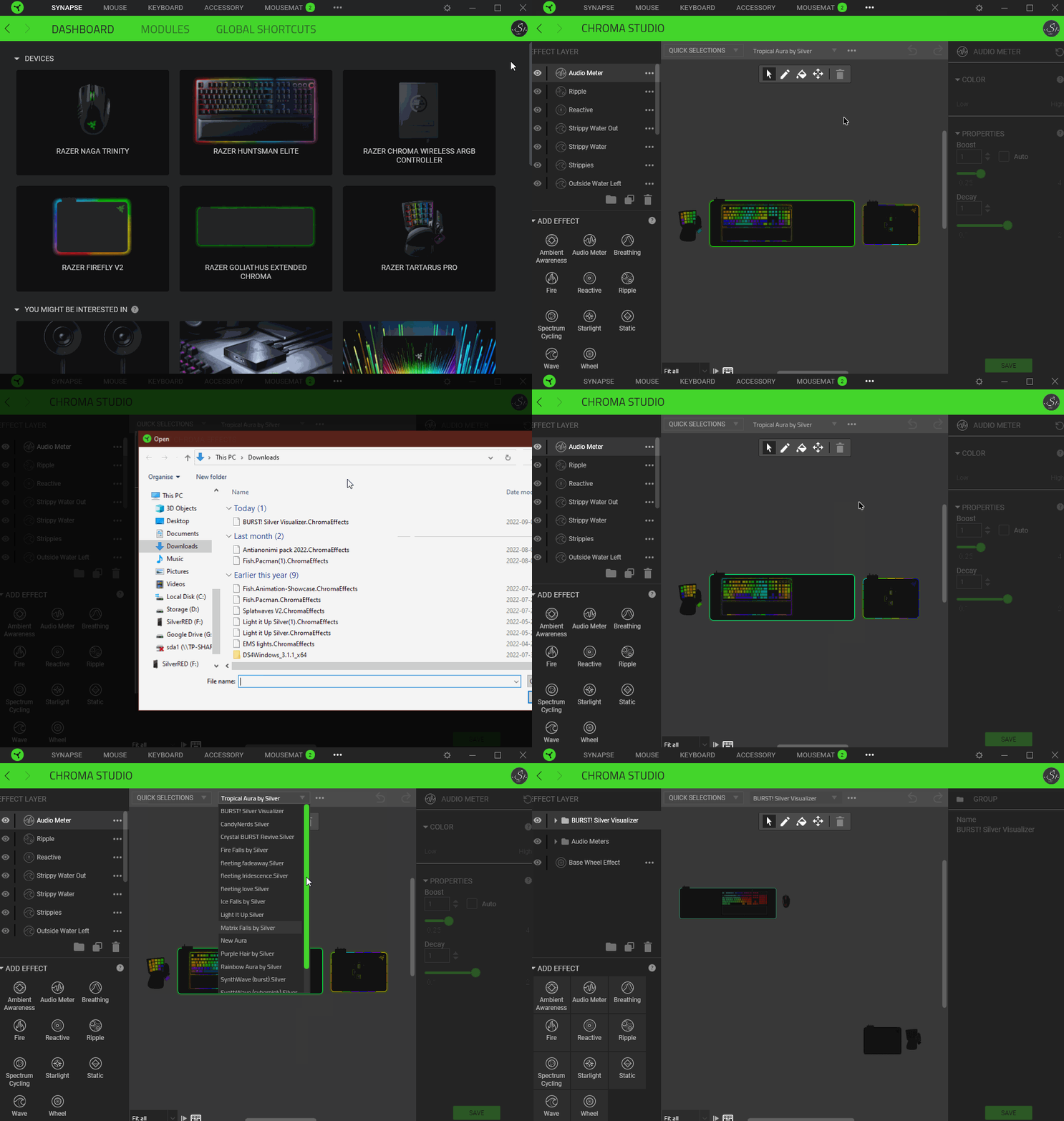
- In Razer Synapse, open Chroma Studio from the top bar. It may be hidden behind the three dots.
- In Chroma Studio, click the three dots and choose Import.
- Locate and select your .ChromaEffects file.
- Select the imported profile by name in the middle dropdown.
Synapse 3 or 4?
Each card and profile page shows its Synapse version. Start with Synapse 4 profiles if you use Synapse 4, or the Synapse 3 archive for an existing Synapse 3 setup. Moving a file between versions may not preserve its effects.
Will it work with my devices?
Check the device tags before downloading. Profiles contain lighting for the maker's hardware. Use the device filter to find profiles that include your model. A matching Synapse version alone does not mean that every effect fits your devices.
Share your profile
- In Chroma Studio, open the three-dot menu and choose Export.
- Upload the .ChromaEffects file to Google Drive. Share a public link to the file, not a folder.
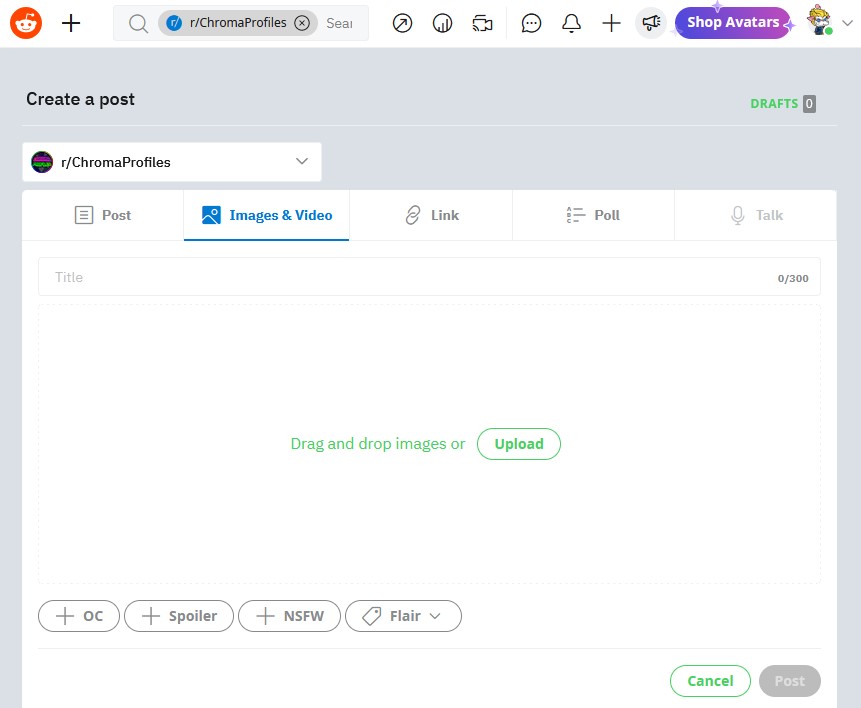
- Post a preview on r/ChromaProfiles. Put the file link in the post itself, not only in a comment.
- Say which Synapse version and devices you used.
Chroma Gallery adds profiles after review. Posting does not guarantee a listing or an update time.
Frequently asked questions
How do I import Chroma profiles into Synapse 4?
Open the Razer Chroma app, go to Studio and choose Import from the three-dot menu. Select your .ChromaEffects file. The Synapse 4 steps above explain the device warning.
How do I import a profile in Synapse 3?
Open Chroma Studio from Synapse 3's top bar, then choose Import from the three-dot menu. Select the file and pick its name in the middle dropdown. See the Synapse 3 steps and demonstration.
Can Synapse 4 use Synapse 3 profiles?
Not reliably. Razer describes these imports as unsupported and recommends rebuilding the effects in the Razer Chroma app. Users report mixed results, including partial imports and dark keys.
A May 2026 update fixed a corrupted-file import error. It is unclear whether that fix covers .ChromaEffects files or only device profiles. Choose a profile marked for your version.
Why does it say "0 out of 1 devices in this profile will be imported"?
The profile contains effects for the maker's devices. Synapse 4 imports the devices that match your hardware. Use the gallery's device filter, or try copying an effect layer to your own device in Chroma Studio.
Is this profile for Synapse 3 or Synapse 4?
Look for the Synapse label beside the download link. A Synapse 4 file is plain text that starts with {. A Synapse 3 file is a ZIP archive. Use Synapse 3 for Synapse 3 files rather than assuming they will work in Synapse 4.
Can I still download Synapse 3?
Not from Razer. Razer retired Synapse 3 on 3 February 2026. It no longer receives updates, its cloud services are off, and Razer removed the installer. An installed copy can still configure the devices it already supports. This site does not host Razer software.
Where can I find Synapse 4 Chroma profiles?
Browse the Synapse 4 gallery and filter it by your device. Razer's Chroma Workshop also offers profiles in the app. Makers share files on r/ChromaProfiles too.
What is Chroma Workshop, and how is this site different?
Chroma Workshop is Razer's own sharing hub. It is in beta and works inside the app. Chroma Gallery is a website with previews, device and effect filters, and a Synapse 3 archive. You can search by profile name, post title or maker before downloading.
Will my old profiles survive the move to Synapse 4?
Razer's Profile Migration tool moves Synapse 3 profiles, macros and Chroma effects. Users report that custom Chroma Studio effects can break. Export your effects first, and keep Synapse 3 installed until the migration is complete.
Why won't my profile import, or why does it show no colours?
- Check that the profile filename ends in .ChromaEffects. If a ZIP download contains several profile files, extract those files first.
- Try a copy on your local drive instead of importing from a cloud or network folder.
- Check the Synapse version and device tags. A mismatch can leave effects missing or keys dark.
How do I share my own profile?
Use Export in Chroma Studio's three-dot menu. Include a file download link, your Synapse version and the devices used in your post. Follow the sharing steps above. There is no separate submission form on this site.
Are the profiles free?
Yes. Every profile download here is free, and each profile credits its maker.